
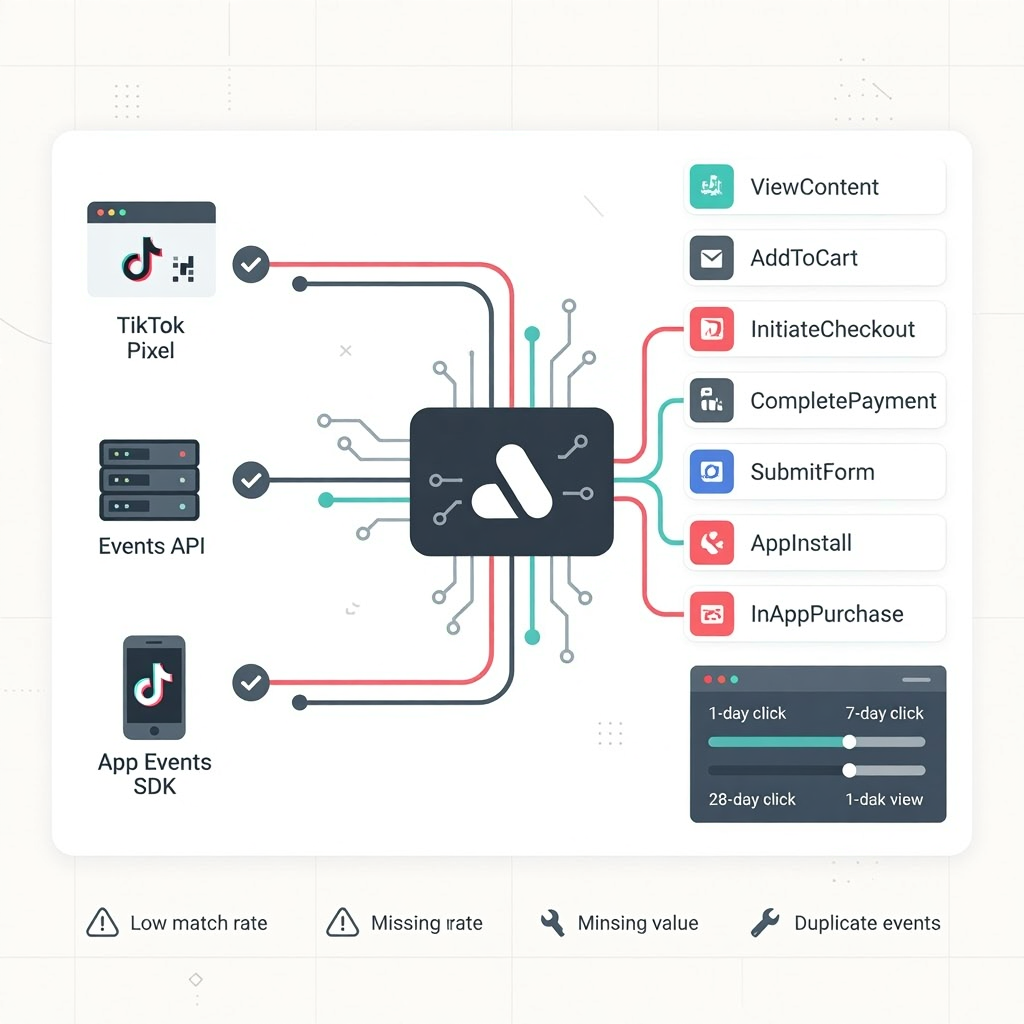
Accurate tracking is the backbone of TikTok Ads performance. Without clean data, the algorithm cannot optimize, attribution becomes unreliable, and scaling becomes unpredictable. TikTok’s tracking ecosystem—built around the TikTok Pixel, Events API, and Attribution Manager—ensures that every conversion signal is captured, validated, and fed back into the delivery system. This pillar explains how TikTok’s tracking works, how to structure events, and how to build a resilient measurement architecture.
How TikTok Tracks Conversions Across Web and App
TikTok uses two primary systems to track user actions:
- TikTok Pixel — browser‑based tracking for websites
- Events API — server‑side tracking for more reliable data
- App Events SDK — for in‑app conversions and post‑install events
These systems work together to capture:
- Page views
- Add‑to‑carts
- Initiate checkouts
- Purchases
- Lead submissions
- App installs and in‑app actions
The more accurate and complete your event data, the better TikTok can optimize delivery.
TikTok Pixel: The Foundation of Web Tracking
The TikTok Pixel is a JavaScript snippet installed on your website. It tracks user behavior and sends conversion signals back to TikTok Ads Manager. Key benefits include:
- Real‑time event tracking
- Audience building for retargeting
- Optimization for lower‑funnel events
- Attribution for purchases and leads
The Pixel alone works, but it can be affected by browser restrictions, ad blockers, and privacy settings—making server‑side tracking increasingly important.
Events API: Server‑Side Tracking for Accuracy
The Events API sends conversion data directly from your server to TikTok, bypassing browser limitations. This ensures:
- Higher event match rates
- More stable attribution
- Better optimization signals
- Reduced data loss from blockers or iOS privacy changes
The strongest tracking setups use both Pixel and Events API in parallel, allowing TikTok to deduplicate events and maintain accuracy.
Structuring Events for Optimization
TikTok supports standard events such as:
- ViewContent
- AddToCart
- InitiateCheckout
- CompletePayment
- SubmitForm
- Contact
- AppInstall
- InAppPurchase
A clean event structure includes:
- One event per action
- Consistent naming
- Passing value and currency for purchases
- Passing content IDs for product‑level optimization
- Using advanced matching (email, phone, IP) when available
This structure helps TikTok understand user intent and optimize toward the highest‑value actions.
Attribution Windows and Measurement
TikTok’s Attribution Manager allows advertisers to choose attribution windows such as:
- 1‑day click
- 7‑day click
- 28‑day click
- 1‑day view
Shorter windows provide more conservative reporting; longer windows capture more delayed conversions. The right choice depends on:
- Sales cycle length
- Product price
- Funnel complexity
- Optimization goals
Most direct‑response advertisers use 7‑day click + 1‑day view for balanced accuracy.
Diagnosing Tracking Issues
Common symptoms of tracking problems include:
- Sudden drop in conversions
- High CTR but low reported purchases
- Pixel firing inconsistently
- Events API duplicates
- Missing value or currency fields
- Low match rates
Fixing tracking issues often leads to immediate performance improvements because the algorithm regains access to clean optimization signals.
Why This Pillar Matters
TikTok’s optimization engine depends on accurate, high‑quality conversion data. A strong tracking architecture ensures stable delivery, reliable attribution, and efficient scaling. Without it, even the best creative and targeting strategies will underperform.