
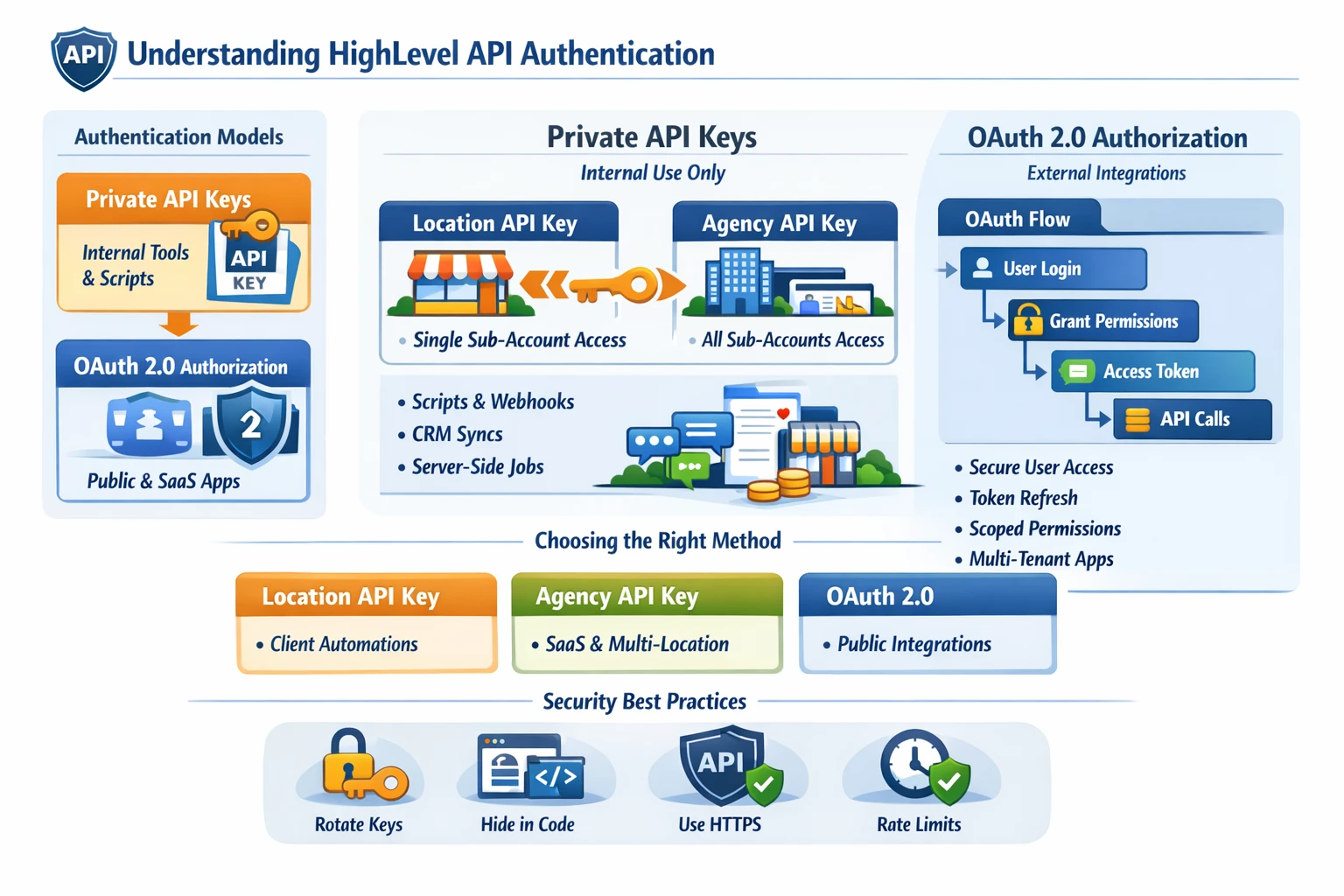
Go High Level’s API is the backbone of advanced automation, SaaS mode, multi‑location orchestration, and external integrations. To use it effectively, you need a clear understanding of how authentication works, the difference between Location API Keys and Agency API Keys, and when to use OAuth 2.0 instead of private tokens. This pillar establishes the security and access model that every other API pillar depends on.
Authentication Models in GHL
GHL supports two primary authentication methods:
- Private API Keys
- OAuth 2.0 Authorization
Both methods authenticate requests to the HighLevel API, but they serve different use cases and offer different levels of access.
Private API Keys
Private API keys are the simplest way to authenticate and are used for internal tools, scripts, and server‑side integrations.
Two Types of Private Keys
- Location API Key
- Scoped to a single sub‑account
- Can only access data inside that location
- Ideal for client‑specific automations, CRM syncs, and workflow triggers
- Agency API Key
- Available only on Agency Pro
- Can access all sub‑accounts under the agency
- Used for SaaS mode, multi‑location dashboards, provisioning, and bulk automation
Where Private Keys Are Used
- Server‑side scripts
- Internal dashboards
- CRM syncs
- Webhooks → API workflows
- Lead routing systems
- Multi‑location SaaS automation (Agency key only)
Security Considerations
- Never expose private keys in client‑side code
- Rotate keys periodically
- Store keys in environment variables
- Use HTTPS for all API calls
Private keys are powerful but must be handled carefully because they grant full access to the associated location or agency.
OAuth 2.0 Authentication
OAuth is required when building:
- Public integrations
- Marketplace apps
- Tools that users outside your agency will authorize
- Multi‑tenant SaaS products that connect to GHL
OAuth provides:
- Secure user authorization
- Scoped permissions
- Token refresh cycles
- Revocation support
OAuth Flow Overview
- User clicks “Connect HighLevel”
- User logs into their GHL account
- User grants permissions
- Your app receives an authorization code
- Your server exchanges the code for access + refresh tokens
- Your app uses the access token to call the API
OAuth is the only method allowed for apps that will be used by multiple agencies or external users.
Choosing Between Private Keys and OAuth
The right authentication method depends on your use case:
Use Private Location API Keys When:
- You’re building internal automations
- You’re integrating a single client’s CRM
- You’re syncing data with your own server
- You’re triggering workflows or updating contacts
Use Agency API Keys When:
- You’re running SaaS mode
- You’re provisioning sub‑accounts
- You’re building multi‑location dashboards
- You’re automating onboarding across all clients
Use OAuth When:
- You’re building a public app
- You’re selling a SaaS product that integrates with GHL
- You need secure user‑level authorization
- You want to publish in the GHL Marketplace
Rate Limits & Best Practices
GHL enforces rate limits to protect system stability. To avoid issues:
- Use caching where possible
- Batch API calls
- Use webhooks instead of polling
- Implement retry logic with exponential backoff
- Avoid unnecessary GET requests
Efficient API usage becomes critical as your automations scale.
Why Authentication Matters for Scaling
Choosing the right authentication model determines:
- How secure your system is
- How scalable your SaaS product becomes
- How easily you can manage multiple locations
- Whether your integration can be public or must remain private
- How much data you can access and automate
A strong authentication foundation prevents future bottlenecks and ensures your GHL automations can grow with your business.