
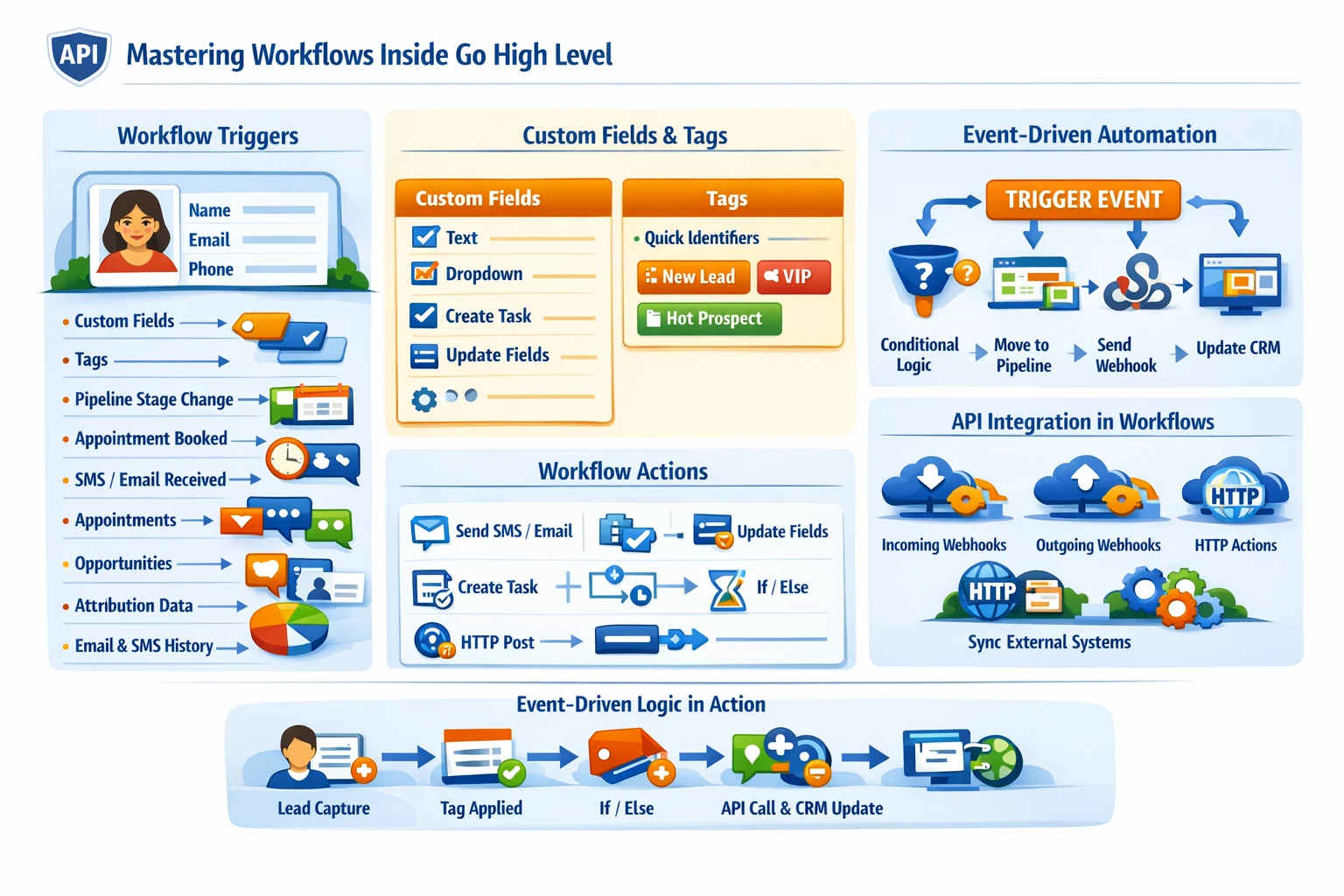
Workflows are the automation engine of Go High Level. They connect every module—contacts, pipelines, calendars, conversations, forms, payments, and the API—into a single, unified system. A strong workflow architecture determines how reliably leads move through your funnels, how consistently clients receive follow‑ups, and how scalable your automations become as you add more sub‑accounts or build SaaS products.
How Workflows Operate Inside GHL
Workflows are built on an event‑driven model. Every automation begins with a trigger and executes a sequence of actions. Because workflows can reference nearly every object in GHL, they serve as the orchestration layer for the entire platform.
Common workflow functions include:
- Lead capture and routing
- Appointment scheduling
- Nurture sequences
- Sales pipeline automation
- Task creation and assignment
- Tagging and segmentation
- Multi‑step onboarding
- API‑driven events and external integrations
A well‑designed workflow system reduces manual work and ensures consistent customer experiences.
Workflow Triggers
Triggers define when a workflow starts. GHL supports a wide range of triggers, including:
- Form submissions
- Survey submissions
- Tag added or removed
- Pipeline stage changes
- Appointment booked, rescheduled, or canceled
- Contact created
- Custom field changes
- Incoming SMS or email
- Webhook received
- API event triggers
- Order form purchases
- Membership access granted
Choosing the right trigger is essential for preventing duplicate automation, loops, or missed events.
Workflow Actions
Actions define what the workflow does after it starts. Key actions include:
- Send SMS or email
- Assign user
- Add or remove tags
- Update custom fields
- Create tasks
- Move opportunities
- Add to or remove from other workflows
- Wait steps (time delays or conditional waits)
- If/Else branching
- Webhooks (send data to external systems)
- API calls (via HTTP action)
- Trigger internal events
These actions allow workflows to function as both automation sequences and integration pipelines.
Event‑Driven Logic
Event‑driven logic is the foundation of advanced GHL automation. Instead of relying on linear sequences, event‑driven workflows respond dynamically to:
- User behavior
- Data changes
- External system updates
- API calls
- Conditional logic
Examples include:
- Moving a lead to a new pipeline stage when a custom field changes
- Triggering onboarding when a payment is received
- Sending a webhook to your server when a lead books a call
- Updating CRM data when an external system posts to a GHL webhook
This architecture allows GHL to function as the central automation hub for your entire business.
Workflow Architecture for Scalability
To avoid complexity and ensure long‑term stability, workflows should follow a modular structure:
- One workflow per major function
- Separate workflows for tagging, routing, and messaging
- Use event triggers instead of chaining long sequences
- Keep messaging workflows separate from CRM update workflows
- Use “Add to Workflow” instead of duplicating logic
- Use custom fields for state tracking
- Use tags only for temporary flags
This modular approach prevents automation conflicts and makes debugging easier.
API Integration Inside Workflows
Workflows can interact with external systems through:
- Incoming webhooks (trigger workflows)
- Outgoing webhooks (send data out)
- HTTP actions (call external APIs)
- API‑driven events (trigger workflows programmatically)
This enables:
- Two‑way CRM syncs
- Lead routing engines
- Custom dashboards
- SaaS provisioning
- External scoring systems
- Multi‑platform automation
When combined with Agency API keys, workflows can orchestrate operations across multiple sub‑accounts.
Avoiding Automation Pitfalls
Common workflow issues include:
- Duplicate triggers
- Infinite loops
- Conflicting updates
- Overuse of tags
- Missing exit conditions
- Too many nested branches
- Long workflows that are hard to debug
A clean architecture prevents these problems and ensures predictable behavior.
Why Workflows Matter for Scaling
Workflows determine:
- How consistently leads are followed up
- How reliably data stays synchronized
- How easily you can onboard new clients
- How scalable your SaaS product becomes
- How much manual work your team avoids
A strong workflow system is the difference between a chaotic CRM and a fully automated revenue engine.